> ## Documentation Index
> Fetch the complete documentation index at: https://docs.clairelabs.ai/llms.txt
> Use this file to discover all available pages before exploring further.
# Course reporting: identify course-wide trends
> Generate a class-level report that surfaces learning trends, teaching gaps, and actionable classroom recommendations across all students in a course.
The class performance report analyzes feedback from multiple students in a single course and identifies patterns, trends, and opportunities to improve your teaching. Instead of reviewing each student's feedback individually, you get a comprehensive summary that reveals common learning challenges, systemic gaps in instruction, what is working well, and where students have blind spots they are not aware of themselves.
**Transitioning to the Insights engine:** While you can still download static class performance reports, we are replacing this feature with the [Insights](/documentation/claire-ai/insights) engine. The Insights engine is much more flexible, allowing you to enter any conversational query and have Claire present the findings to you directly. We recommend using Insights as your primary tool for course-wide analytics.
## Generate a class performance report
Navigate to the Course page for the [course](/documentation/course/assessments) you want to analyze.
In the [Assessments](/documentation/course/assessments) table, locate the assessment you want. Click the icon button, then choose Download from the dropdown.
In the download options that appear, select Performance summary.
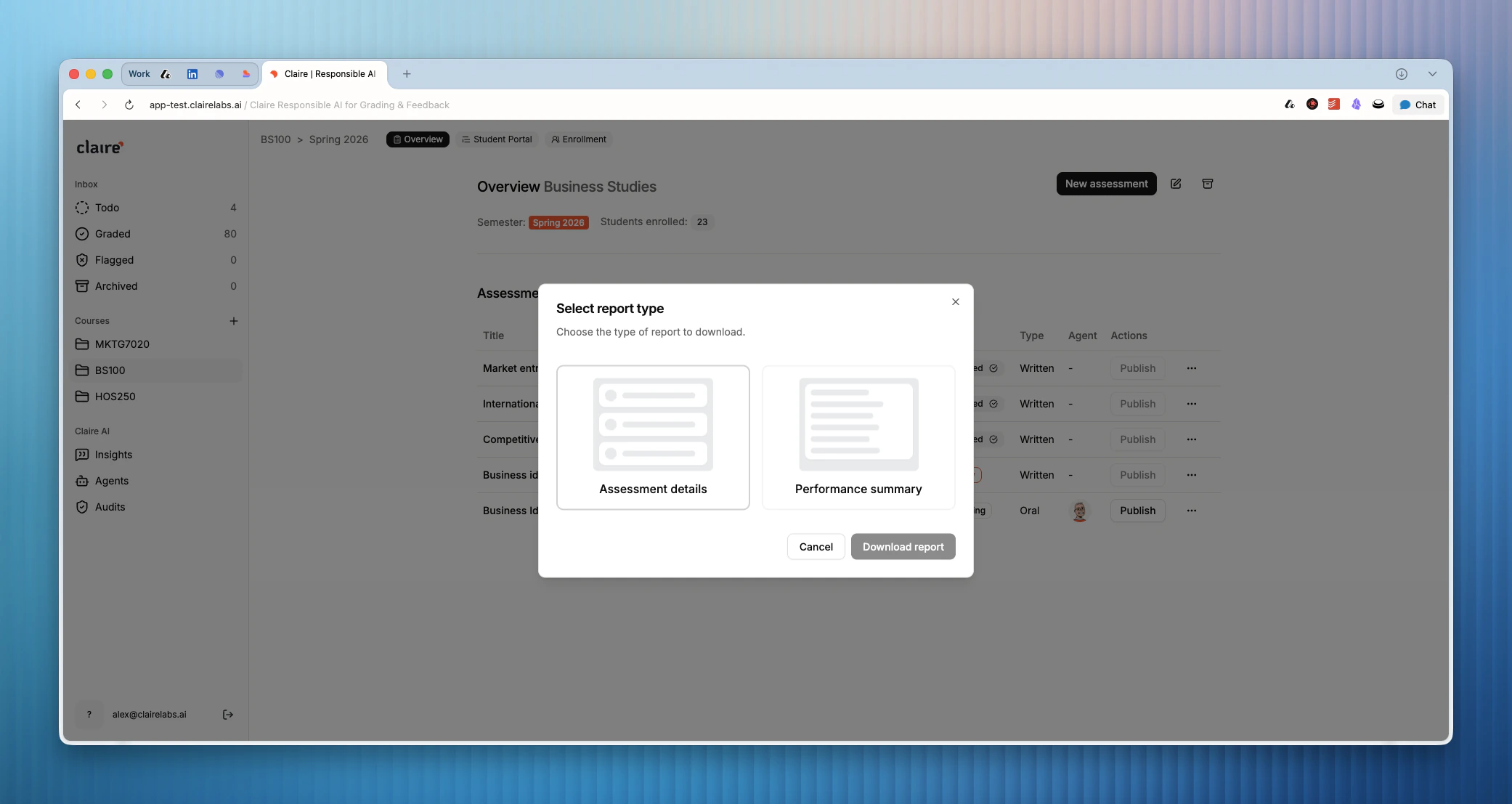 Click Download report. Claire generates the report and downloads it to your device automatically.
## What the report contains
The report is organized into four main sections:
### Summary
A 2–3 paragraph overview of the most critical findings and their implications for your teaching. This is the quickest way to get the top-level picture before diving into the detail.
### Class performance overview
A quantitative breakdown showing how the class performed across each rubric criterion. For example: *"8 out of 12 students scored 'Developing' on Critical Analysis."* Use this section to identify which criteria need the most attention.
### Key findings
Five dimensions of class performance, each presented as a focused analysis:
| Dimension | What it covers |
| ---------------------------- | ------------------------------------------------------- |
| Clarity of instructions | Whether students understood the assignment requirements |
| Common misconceptions | Recurring misunderstandings across the class |
| Mutual strengths | Areas where the class consistently excels |
| Shortcomings & learning gaps | Where students consistently struggle |
| Blind spots | Gaps students do not recognize in themselves |
### Actionable recommendations
Two types of recommendations you can act on immediately:
Use the **What you could try** recommendations as a starting point for your next class session. They are designed to be practical and immediately actionable — not broad curriculum changes, but specific activities or discussion prompts you can introduce in the near term.
* **Focus areas** — The 3–5 most critical issues, ranked by urgency and impact, so you know where to direct your energy first.
* **What you could try** — Specific in-person classroom interventions tied to each focus area.
***
**Looking for more details?**
* To query your student performance and feedback data conversationally, see [Insights](/documentation/claire-ai/insights).
Click Download report. Claire generates the report and downloads it to your device automatically.
## What the report contains
The report is organized into four main sections:
### Summary
A 2–3 paragraph overview of the most critical findings and their implications for your teaching. This is the quickest way to get the top-level picture before diving into the detail.
### Class performance overview
A quantitative breakdown showing how the class performed across each rubric criterion. For example: *"8 out of 12 students scored 'Developing' on Critical Analysis."* Use this section to identify which criteria need the most attention.
### Key findings
Five dimensions of class performance, each presented as a focused analysis:
| Dimension | What it covers |
| ---------------------------- | ------------------------------------------------------- |
| Clarity of instructions | Whether students understood the assignment requirements |
| Common misconceptions | Recurring misunderstandings across the class |
| Mutual strengths | Areas where the class consistently excels |
| Shortcomings & learning gaps | Where students consistently struggle |
| Blind spots | Gaps students do not recognize in themselves |
### Actionable recommendations
Two types of recommendations you can act on immediately:
Use the **What you could try** recommendations as a starting point for your next class session. They are designed to be practical and immediately actionable — not broad curriculum changes, but specific activities or discussion prompts you can introduce in the near term.
* **Focus areas** — The 3–5 most critical issues, ranked by urgency and impact, so you know where to direct your energy first.
* **What you could try** — Specific in-person classroom interventions tied to each focus area.
***
**Looking for more details?**
* To query your student performance and feedback data conversationally, see [Insights](/documentation/claire-ai/insights).